
Alipay is one of the most useful payment apps for international travelers in China. It can help with many everyday payments, especially QR-code payments at restaurants, convenience stores, taxis, cafes, attraction shops, and small merchants. The key is to set it up before the moment you need to pay.
This guide is a practical setup checklist, not an official Alipay manual. App labels may change by country, phone system, app version, card network, and risk-control review. Use this article together with the official payment guidance linked below, and keep a backup method ready.
If you are still comparing payment methods, start with how international travelers can pay in China. If you also plan to use WeChat, read how to set up WeChat Pay for China travel after this article.
Before You Open the App
Prepare these items first: your passport name, an overseas mobile number that can receive verification codes, at least one eligible international credit or debit card, your card issuer's banking app, and a stable internet connection. If your bank still uses travel notices or overseas transaction controls, update those before departure.
Do not depend on one card only. Even when a card network is supported, the card issuer can still block an overseas wallet transaction, request extra verification, or apply a daily limit. A second card, some renminbi cash, and a second payment app make the trip less fragile.
Step 1: Download Alipay From an Official App Store
Install Alipay from the Apple App Store, Google Play where available, or another official app channel used by your phone. Avoid APK files, unofficial download links, social media file shares, and screenshots that ask you to scan an unknown QR code to install an app.
Use a phone number you can continue to access during travel. If you will switch to an eSIM or local SIM after arrival, make sure your original number can still receive account verification messages or that you have already completed the setup before changing numbers.
Step 2: Register or Sign In
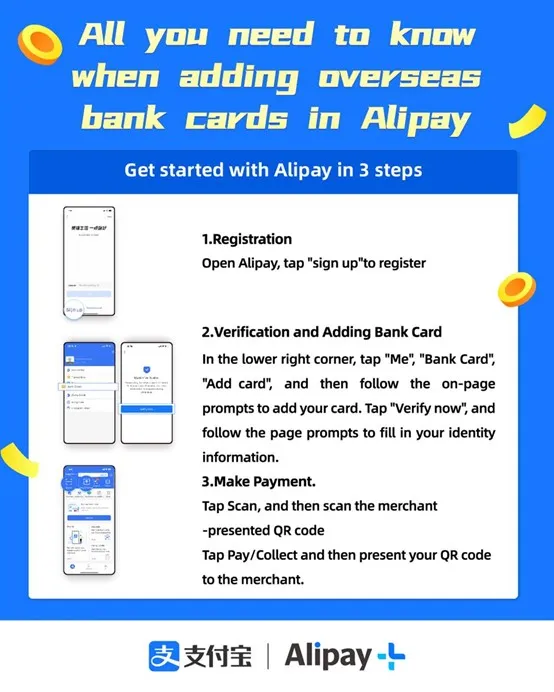
Open Alipay and register with your phone number, or sign in if you already have an account. Complete any basic profile prompts carefully. Your name and identity details should be consistent with the passport and card records you may use for verification.
Some travelers can finish the basic account quickly; others may see additional checks. If a verification prompt appears, handle it while you have time. Do not postpone every prompt until you are standing at a restaurant counter or trying to leave a taxi.
Step 3: Add an Overseas Bank Card
In the app, look for a card or bank-card management area. Menu names can vary, but the flow is usually similar: account or profile area, bank cards, add card, card information, verification. Enter the card details exactly as required by the app and your card issuer.
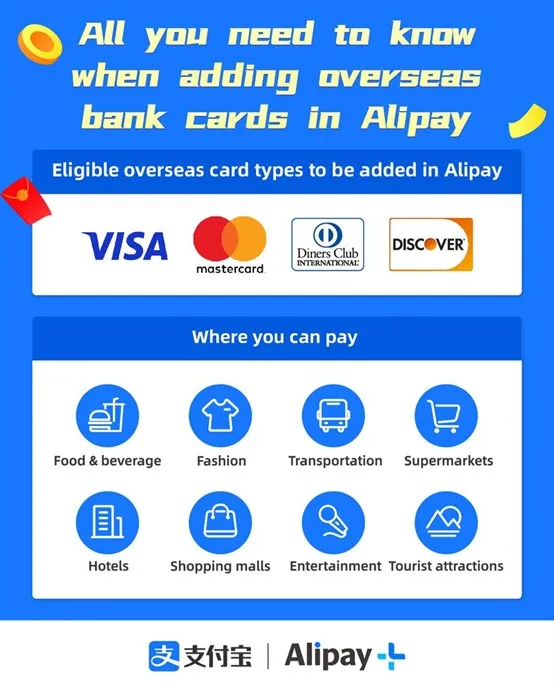
Supported card networks and card types can vary. Official Chinese payment guidance has encouraged the use of overseas bank cards with mobile payment apps, but a specific card can still fail because of issuer controls, card type, regional rules, or risk checks. If one card fails, try another eligible card rather than repeatedly retrying the same one.
Step 4: Complete Identity and Bank Verification
You may need to verify identity information, confirm a card security code, receive an SMS code, or approve the transaction attempt in your bank's app. Keep your passport and card issuer app available. If the bank sends a small authorization or security prompt, review it carefully before approving.
If verification fails, check the simple causes first: wrong billing details, blocked overseas transaction, expired card, poor network, phone number that cannot receive codes, or a name mismatch. If the app asks you to contact the issuer, do that before trying several more times.
Step 5: Test a Small Payment After Arrival
The best test is a small, low-pressure transaction after arrival: a bottle of water, a coffee, or a convenience-store purchase. Learn whether the merchant wants to scan your payment code or wants you to scan their QR code. Confirm the amount on screen before approving.
What Alipay Is Good For During a China Trip
- Everyday QR-code payments at many restaurants, cafes, shops, and local merchants.
- Small personal purchases where overseas card terminals are not convenient.
- Some transport, local services, and mini-program style payment flows, depending on your account and card support.
- A backup to WeChat Pay if one app or card route fails.
Where Alipay May Still Fail
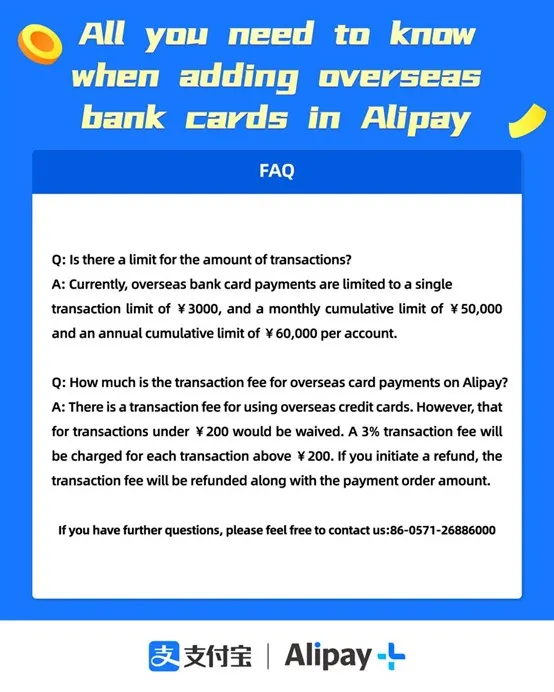
Do not assume one successful payment means every payment will work. Some merchants may not support overseas-card-linked wallet payments, some transaction categories may be restricted, larger payments may trigger review, and your bank may decline a transaction even when the app itself is working.
For hotels, formal travel services, deposits, or larger payments, check the payment method and written record before paying. Our guide to what to confirm before paying for a China trip explains that separate decision.
Security Tips
- Use only official app stores and official app updates.
- Do not share one-time passcodes with anyone.
- Do not scan payment QR codes sent by strangers in private messages.
- Keep your phone locked and enable device-level biometric protection if you use it.
- Take screenshots of successful receipts only when needed, and avoid exposing full card or passport details.
Official References
- Shanghai Municipal Government: adding overseas bank cards in Alipay
- The State Council: payment guide for visitors to China
- People's Bank of China: guide to payment services in China
- Mastercard and Alipay: travel cashless in China guide
- UnionPay International: mobile payment services
FAQ
Should I set up Alipay before landing in China?
Yes. Install the app, register, add a card, and complete verification before the trip if possible. It is much easier to solve setup problems before a travel day starts.
Can I use Alipay without a Chinese bank account?
Many overseas visitors can use supported international cards, but eligibility depends on the app, card network, card issuer, and current rules. Always keep a backup payment method.
Is Alipay enough by itself?
No. It is useful, but travelers should also prepare another card, some cash, and ideally another payment option such as WeChat Pay.