
WeChat Pay, also known as Weixin Pay in mainland China, is a major daily payment tool. It is especially useful when your trip already involves WeChat communication with local contacts, hotels, restaurants, drivers, guides, or service providers. For many international travelers, setting it up before arrival can reduce payment friction after landing.
This article explains a practical setup flow for visitors. It is not an official Tencent manual, and app labels can change. Use the official references below for current policy details, and keep Alipay, cards, and cash available as backup.
For the bigger payment picture, read how international travelers can pay in China. If you want the parallel app setup, see how to set up Alipay for China travel.
Before You Start
Prepare a working WeChat account or the phone number you will use to create one, your passport details, an eligible overseas bank card, your card issuer's banking app, and reliable internet. If your card issuer requires app approval or SMS verification, make sure you can receive it while traveling.
Do not rely on one family member's phone. If two adults may separate during the day, each adult should ideally have their own payment setup and at least one backup payment method.
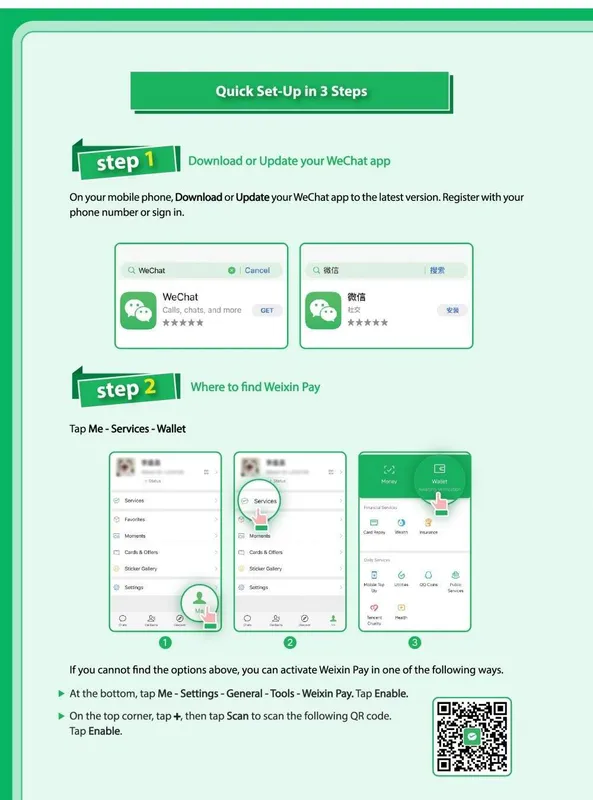
Step 1: Install WeChat and Make Sure the Account Works
Download WeChat from an official app store. Create an account or sign in before departure, then confirm that you can receive messages and security prompts. Payment setup is harder if the account itself is not stable.
Some travelers see security checks when registering, logging in on a new phone, or using a new network. Handle those checks before the trip if possible. If your WeChat account is new, do not leave all payment setup until your first travel day.
Step 2: Find WeChat Pay or Wallet
Open WeChat and look for the payment area. Depending on app version and region, this may appear under Me, Services, Pay and Services, Wallet, or Cards. If you do not see the same label used in a screenshot online, do not panic; app navigation changes often.
Look for a card-management flow that lets you add a bank card. If payment features are not visible, update the app, check region/account settings, and confirm that your account is fully activated.
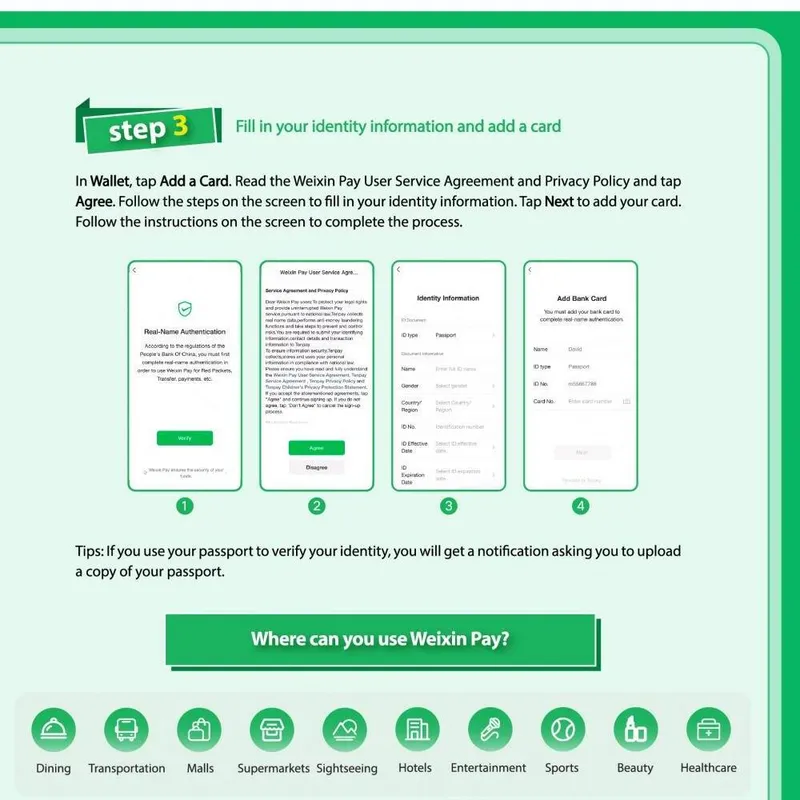
Step 3: Add an Eligible Overseas Card
Enter your card information carefully and complete any bank or app verification prompts. Tencent has stated that overseas users can link international cards with Weixin Pay for use across many merchants in mainland China, but individual results still depend on card type, issuer controls, network support, and risk review.
If one card fails, try another eligible card. Do not keep retrying the same card many times in a row, because repeated failed attempts can trigger more risk controls.
Step 4: Complete Identity Verification
Some users may need to provide identity information or complete additional checks before card-linked payments work smoothly. Use your real passport details where required, and keep the name consistent with your card and travel documents.
If verification fails, check whether the phone number can receive codes, whether your bank app is blocking overseas card-linking, and whether the card details match the issuer's records. If the app or bank gives a specific error, follow that route rather than guessing.
Step 5: Learn the Two Common Payment Flows
In daily use, the cashier may scan your payment code, or you may scan the merchant's QR code and enter the amount. Always confirm the amount and merchant before approving. For a first test, choose a small purchase at a low-pressure moment.
When WeChat Pay Is Especially Useful
- When your local communication is already happening in WeChat.
- When restaurants, hotels, drivers, or service providers send payment-related instructions through WeChat.
- When Alipay has a temporary card or verification problem and you need another app option.
- When a merchant is more familiar with WeChat Pay than direct overseas card payment.
Limits and Backup Planning
Payment policies, transaction limits, and fees can change. Some promotions or fee waivers may be time-limited, tied to transaction size, or linked to first use. Check the current app message and official guidance rather than relying on an old screenshot from a forum.
For a first China trip, use WeChat Pay as one part of a payment mix: WeChat Pay, Alipay, one or two bank cards, and a modest amount of cash. Our pre-departure checklist explains how payment preparation fits with documents, connectivity, and arrival planning.
Security Tips
- Download WeChat only from official app stores.
- Do not share login codes, payment passwords, or bank verification codes.
- Be careful with QR codes sent by strangers or unofficial support accounts.
- Keep your phone locked and protect your WeChat account with strong device security.
- For larger payments, confirm the merchant, amount, currency, and receipt before retrying a failed transaction.
Official References
- Tencent: Welcome to China, easy pay with Weixin Pay
- Tencent: Weixin Pay enhances payment experience for overseas users
- Beijing Municipal Government: WeChat Pay fee-waiver notice for overseas visitors
- People's Bank of China: guide to payment services in China
FAQ
Do I need WeChat Pay if I already have Alipay?
It is not always required, but having both apps gives travelers more resilience. One app may work when the other has a card, network, or merchant-acceptance issue.
Can I set up WeChat Pay with an overseas card?
Many overseas users can link supported international cards, but results depend on current app support, card network, issuer controls, and verification. Keep backup payment methods ready.
Should I test WeChat Pay before a busy travel day?
Yes. Try a small transaction first, then keep the successful flow in mind for taxis, shops, restaurants, and other daily spending.