
Updated on June 3, 2026. Internet access is one of the first practical problems international travelers meet after landing in China. You may need mobile data for airport pickup messages, hotel navigation, payment setup, translation, ride-hailing, train tickets, restaurant queues, and family communication. The right choice is not always the cheapest data plan. It depends on whether you need a China mobile number, whether your phone supports eSIM in China mainland, and how much friction you can tolerate on arrival day.
This guide compares four common options: international roaming, travel eSIM, local physical SIM card, and airport or hotel Wi-Fi. It is written for first-time visitors, families, senior travelers, business guests, and travelers who want a smooth first day after arrival.
For a wider pre-departure plan, read our first China trip preparation checklist. If you are landing late or meeting a driver, pair this with our China airport arrival support guide.

The short answer: choose by phone number, not only data
Many travelers compare only the amount of data. That is too narrow for China travel. A data-only eSIM may let you browse the web and use maps, but it may not give you a local China mobile number. A local physical SIM card usually gives you both mobile data and a local number, but it requires passport-based real-name registration and may take time at the airport or a city service counter.
Before choosing, ask yourself three questions:
- Do I only need data, or do I also need a China mobile number for SMS verification?
- Does my phone support the plan I want: physical nano-SIM, eSIM, or both?
- Can I handle setup after a long flight, or should I arrange the option before arrival?
For many first-time visitors, the safest setup is international roaming or a travel eSIM as a temporary backup for the first hour, plus a local SIM card if a China number is important for the trip. Business travelers and guests staying longer than a few days often benefit from having a local number.
Option 1: international roaming
International roaming is the simplest option because you keep your home number and avoid local setup. It is useful for airport arrival, messaging, banking verification from your home country, and emergency calls to family. The downside is cost, speed limits, data caps, and the possibility that some local China services still prefer a China mobile number.
Roaming is best when you are in China for a short stop, travel with a guide or company support, do not need local app registration, and want minimum setup. Before departure, check your carrier's roaming package, daily cap, throttling rule, hotspot availability, and whether roaming data works on your phone model in China.
Option 2: travel eSIM
A travel eSIM can be convenient because it can often be installed before departure. It may be enough for maps, messaging, email, translation, and general browsing. However, many travel eSIMs are data-only. They may not provide a local China phone number or SMS reception, which matters for some China apps and services.
There is another important point: eSIM support in China mainland is device- and carrier-specific. Apple says on its official support page that only certain iPhone models support eSIM in China mainland, and other iPhone models, including those purchased outside China mainland, cannot install an eSIM profile from China mainland carriers. Apple also says activating a China mainland carrier eSIM requires visiting the carrier store for ID verification.
This does not mean every travel eSIM will fail. Many travel eSIMs are provided by non-mainland operators and behave differently from a China mainland carrier eSIM. But it does mean you should not assume that an eSIM-only phone can simply buy a normal local China carrier eSIM after landing. Check your exact phone model, eSIM provider, and whether the plan includes only data or also a phone number.
Official reference: Apple Support: Using eSIM with your iPhone in China mainland.
Option 3: local physical SIM card
A local physical SIM card is often the most practical choice for travelers who need a China mobile number. A local number can help with app registration, delivery contact, hotel communication, attraction booking, ride-hailing, train ticket notices, and local customer service calls. It also makes it easier for drivers, hotels, and support staff to reach you.
Beijing's official service page explains that after obtaining a local SIM card, travelers can use a local mobile phone number to access the Internet, download popular mobile apps for services such as ride-hailing and food delivery, purchase park tickets, and make electronic payments. It also explains that travelers can apply online first and collect a card offline at a Beijing airport service counter for certain operators, with staff assisting on site.
Official reference: Beijing Service: PEK SIM Card Application/Collection.
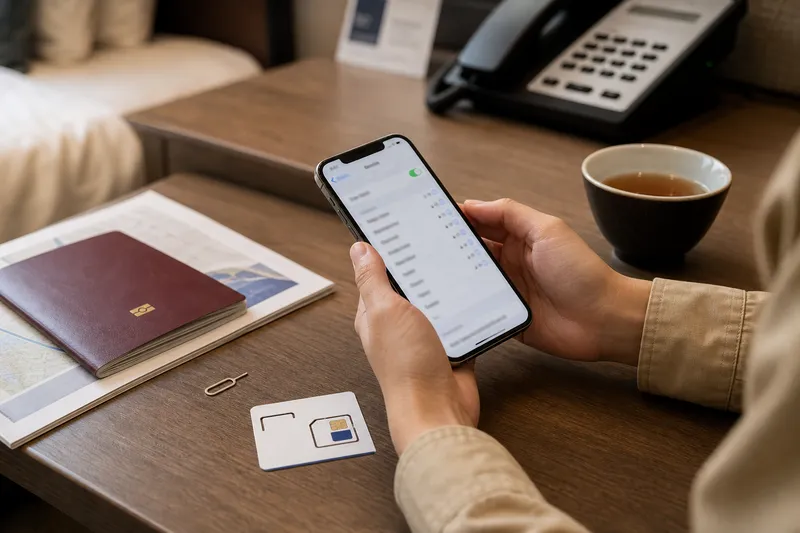
To use a local physical SIM, prepare:
- Original passport.
- Unlocked phone that accepts a physical nano-SIM, unless the provider gives a different format.
- Enough time for real-name registration and activation.
- A payment method accepted at the counter or store.
- Your hotel address and emergency contact, if requested during setup.
If your phone is locked to your home carrier, a local SIM may not work. Check this before departure. If you use an iPhone model from the United States that has no physical SIM tray, do not assume you can buy a local physical SIM card in China. You will need a workable roaming or eSIM plan before arrival, or another device.
Option 4: airport Wi-Fi and hotel Wi-Fi
Airport Wi-Fi is useful as a temporary bridge before your SIM or eSIM is working. Beijing's official airport Wi-Fi page says travelers can get a number from a Wi-Fi number machine to connect to airport Wi-Fi before obtaining a local SIM card, and staff at the Beijing Service airport counter can assist with connection.
Official reference: Beijing Service: PEK Airport Wi-Fi.
Hotel Wi-Fi is helpful after check-in, but it is not enough for the whole trip. You still need data when walking to restaurants, calling a driver, scanning a payment code, showing a train ticket, translating at a pharmacy, or contacting the hotel from outside. Treat Wi-Fi as backup, not your main travel network.
Which option fits your trip?
| Traveler situation | Better first choice | Reason |
|---|---|---|
| Short stopover or guided visit | International roaming or travel eSIM | Fastest setup and enough for basic messaging and maps. |
| First-time visitor using ride-hailing, tickets, and local apps | Local physical SIM plus roaming backup | A China number can reduce app and contact friction. |
| eSIM-only phone with no SIM tray | Pre-arranged travel eSIM or roaming | Local physical SIM is not possible, and local carrier eSIM rules are device-specific. |
| Family or senior traveler | Roaming backup plus assisted local SIM setup | Reliable contact matters more than saving a small amount of money. |
| Business visitor staying one week or longer | Local number if practical | Useful for meetings, hotel contact, delivery, and local service calls. |
Payment apps and internet access affect each other
Mobile payment setup is much easier when your phone has stable data. If Alipay or WeChat Pay needs card verification, SMS, identity confirmation, or app updates, weak airport Wi-Fi can make the first payment attempt stressful. It is better to prepare payment apps before departure and test them with your home network before landing.
Read our detailed payment guide: How International Travelers Can Pay in China: Alipay, WeChat Pay, Cards, and Cash. If you want app-specific setup, see our guides for setting up Alipay and setting up WeChat Pay.
Hotel check-in, maps, and arrival support
A working phone makes hotel check-in easier. You can show the booking confirmation, call the hotel, open the address in Chinese, contact your driver, and receive messages if the front desk needs clarification. If you are arriving late, do not rely on hotel Wi-Fi that you can only access after check-in.
Our China hotel check-in guide explains why passport registration, booking names, and late-night arrival need extra planning. For arrival-day coordination, keep your network plan connected with your pickup plan.

Common mistakes to avoid
- Assuming every eSIM gives a China number: many are data-only.
- Arriving with an eSIM-only phone and no backup: local physical SIM setup is impossible without a SIM tray.
- Waiting until the airport to research plans: after a long flight, you may be tired, offline, and under time pressure.
- Depending only on hotel Wi-Fi: most travel friction happens outside the hotel.
- Ignoring phone lock status: a carrier-locked phone may reject a local SIM.
- Forgetting family members: one connected phone may not be enough if the group separates.
Arrival-day setup plan
- Before departure, check whether your phone is unlocked and whether it has a physical SIM tray.
- Buy or activate a short roaming or travel eSIM backup if you need immediate data after landing.
- If you need a China number, plan where to get a local SIM and bring your original passport.
- Save your hotel address, pickup contact, and booking confirmation offline.
- After landing, connect to airport Wi-Fi or temporary roaming first, then handle SIM setup only if time and energy allow.
- Test maps, messaging, payment apps, and hotel contact before leaving the airport.
If your trip depends on airport pickup, hotel handover, local payment, or senior traveler support, contact Jiangmi Travel through the official contact page. We can help plan the practical arrival sequence, while telecom service availability and device compatibility should always be checked against the relevant official provider information.